
Why I Shut Down Throughline
A personal dashboard built with Claude in September 2026, what went wrong with it, and why it was turned off after a few weeks.
For a few weeks this September I built a personal dashboard called Throughline. I wanted one screen, pinned as an app window on my laptop and on my phone's home screen, that showed my day: today's tasks, my calendar, my primary inbox and a short note from Claude on what mattered. I wanted to tick things off right there, and I wanted it to get better week over week, with a Sunday review that looked back at what I'd finished, what kept slipping and what I should change. That weekly thread is where the name came from. I picked it from a list of 15. I'd looked at an existing widget app first, but it only runs on iPhone and I use Android, so I built my own.
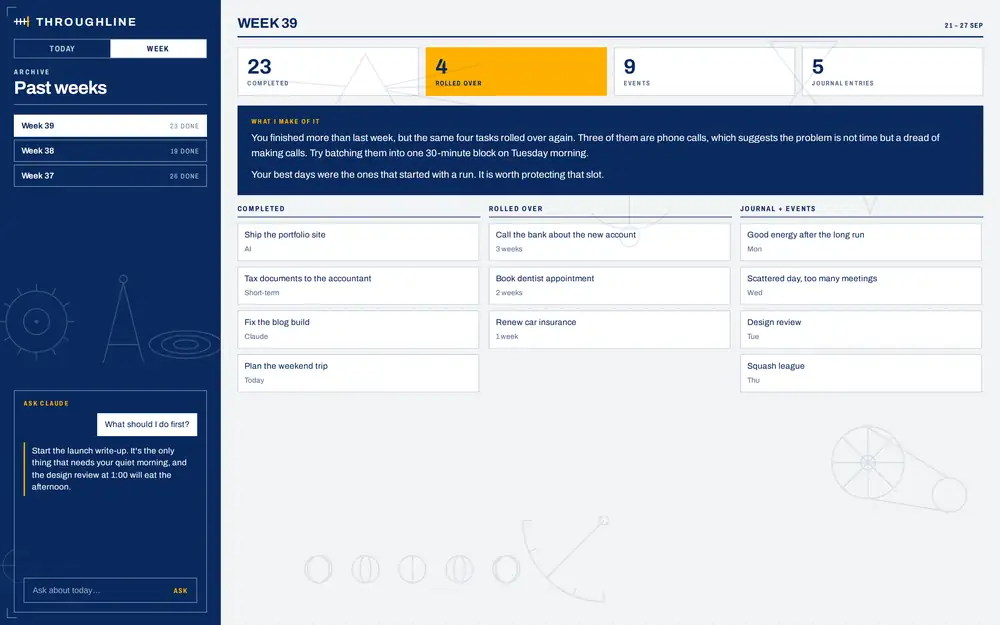
I built it the way I build most things now, in conversation with Claude. Throughline was a single web page hosted inside Claude. It had two layers. The live layer checked Google Tasks and Gmail every minute and Google Calendar every half hour through connectors, and showed all five of my task lists as a board I could move tasks around on. The judgement layer was a scheduled Claude run every hour from 6 AM to 10 PM that wrote a headline for the day, notes on individual tasks and a reading suggestion, and filed a task automatically when one of my side projects failed to deploy. A second run every Sunday night wrote the weekly review, with an archive so I could look back at earlier weeks. The brief also pulled in my reading queue, my journal and the status of my GitHub and Railway projects, and there was a box at the bottom to ask Claude a question without leaving the page. I also asked for a separate weekend version, with family and personal things first and no deploy errors.
I spent a lot of time on the design. It went through four visual directions before I landed on a blueprint look: deep blue and paper white, with amber used only for things that needed attention right now. I still think it looked good.
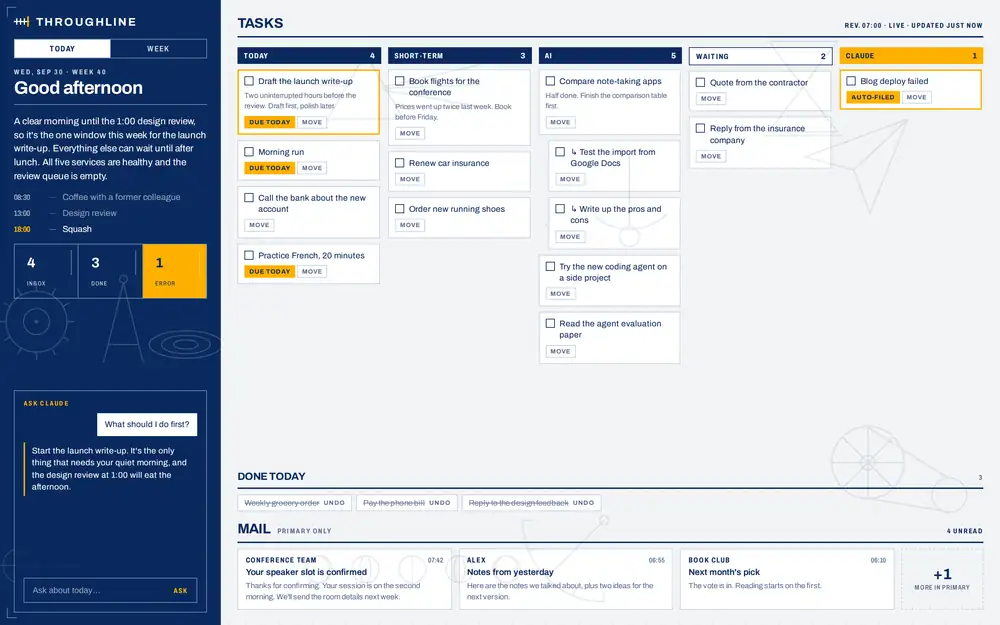
Google Tasks can't move a task from one list to another, so a move is really a copy and a delete, and the task loses its history along the way. Every move on the board offered an undo for 12 seconds in case I'd dragged something to the wrong list.
I never got to the point where I trusted it. Tasks were often out of date. Ticking things off in Throughline sometimes made tomorrow's repeating tasks show up early in Google Tasks. Subtasks landed in the wrong place. It was expensive to run too, because a Claude session woke up every hour to rebuild a briefing that mostly hadn't changed.
At the end of September I asked Claude to step back and score the whole thing against what I'd set out to do. Most of the goals were only partly met, or not met at all. And for weeks the live layer hadn't been live. The page was asking for the Google Tasks connector by the wrong name, so every live request was failing quietly and the page fell back to the last snapshot the scheduled run had written. Nothing on screen said anything was wrong. It just looked a little stale, so I kept using it.
We fixed that, along with fewer live checks per minute, a label showing how fresh the data was, and the hourly run cut to three times a day. Then I hit a bigger problem. I wanted three things at once: to act from Throughline, to keep Google Tasks as the source of truth in case Throughline broke, and to see only today's tasks in both places. Google Tasks can't give you all three. Its repeating tasks only behave properly when you tick them in Google's own app. Tick them from anywhere else and the next occurrence appears immediately. Every workaround moved the source of truth somewhere I didn't want it, or asked me to change how I work to suit the tool.
Most of what I'd built was the part any task app already does well: showing tasks, syncing ticks, handling repeats. Claude's suggestion was to switch to a standard task app like Todoist or TickTick and keep a short daily briefing from Claude. I didn't want to pay for another app, so I stayed on Google Tasks as it is. The part only Claude could add, a read on what matters today and a look back at the week, was the smallest and most reliable piece of the whole thing.
So I turned it off on September 30 and deleted the page. It was strange to delete something I'd put that much care into. But it wasn't doing the job I built it for, and keeping it running cost more than it gave back.
A few things I'm taking with me:
- When something breaks, the product should say so on screen, not keep showing old data as if it were current.
- Build the part only you can build, and use an existing tool for the rest.
- Check early whether the foundation can do what you need. I spent weeks working around the limits of a simple task app.
- Ask whether the thing should exist before asking how to fix it. I asked that last, and it was the most useful question of the project.
I don't regret building it. I learned more about connectors, scheduled runs and live data in those few weeks than I would have from reading about them.