
Building a PM Operating System
Six layers in one repo, from a rules file to scheduled jobs, that hold my AI setup at work together and make it easier to fix.
Over the past few months my AI setup at work grew piece by piece: a skill here, a scheduled job there, a rule I added after a mistake. Recently I pulled it all into one repo and started treating it as a unified system. I call it my Product Management Operating System.
It has six layers, and each one does a different job:
- A rules file the assistant loads in every session
- Memory, with one fact per file
- Standing items I see every day
- Skills and hooks
- Small in-app tools
- Scheduled jobs that run without me
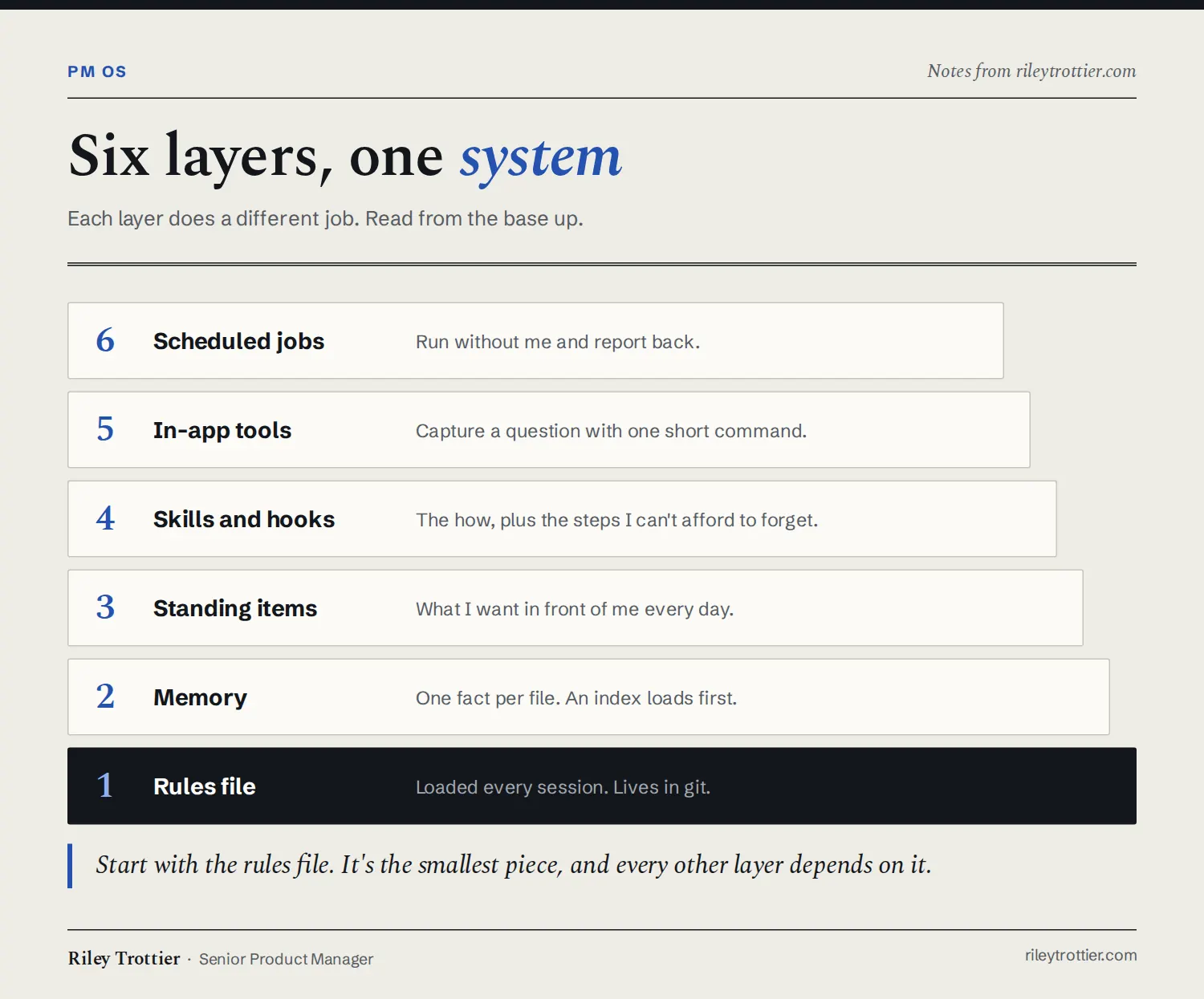
The base is a short file of rules the assistant loads in every session. It only holds rules that apply everywhere, like "write a placeholder instead of inventing a number" and "draft, but don't change shared documents without my yes". The file lives in git, so every change to how my assistant behaves has a history.
In practice, the placeholder is a bracketed note starting with NEED that says what's missing and where to get it, so I can spot the gap when I read through. And a yes to one change doesn't carry over to the next.
New rules get added in a set way as well. When I correct the assistant, it proposes a one-line change to the rules and waits for my yes. If I approve it, the rule applies from the next session on.
Next is memory. Each memory is a small file holding one fact: who a stakeholder is, a decision that's been made, or a preference I've stated. An index of one-line pointers loads at the start of a session, and the full file only gets read when it's relevant. When a fact turns out to be wrong, it gets fixed or deleted, so stale facts don't pile up.
Managing a lot of different chats can get complicated, and it's easy to forget about something you were working on. So I keep a short list of standing items, things I want in front of me every day. It's added at the start of every session and shown in a band above where I type, along with a gauge showing how full the conversation's context is.
Then come skills, the reusable instructions for tasks I do often, and hooks, which fire automatically on events. For work I have about 45 skills, plus 8 reviewer agents that each read a document from one point of view. Once a month a scheduled job reads my past month of AI sessions and suggests skills to add or fix.
Hooks cover the things I don't want to depend on the assistant remembering. One hook logs every file the assistant writes. Another blocks obviously destructive commands. Another reminds me to run a review if I'm about to wrap up a session after writing a deliverable without one. My writing check is a hook too. The assistant can't send an email or chat message until the text has been through a pass that strips out AI writing habits (messages to myself are exempt).
The newest layer is small in-app tools. My favorite captures a question with one short command, even while the assistant is busy with something else. The questions wait in an inbox until I hand them to the assistant to file properly. It never writes to the tracker on its own, which is the same draft-first rule from the base layer. I use Routines in Claude Code to enable this, which I highly recommend for anyone who wants to make AI work for them, rather than have it wait to reply to you.
Last are the scheduled jobs that run without me and report back: a daily digest, a weekly scanner and a monthly review. Some of them first ran on a cloud scheduler that couldn't reach my email or sign in to other systems, so I moved them to my own machine. Their prompts live in git like everything else. The daily digest checks whether anything changed before it writes, so on a quiet day it stays quiet.
I call it an OS because the layers depend on each other. Rules say what must always be true, memory records what's true right now, skills handle the how, and hooks enforce the parts I can't afford to forget. When something goes wrong, I can usually tell which layer failed and fix it there, instead of re-explaining myself in the next chat.
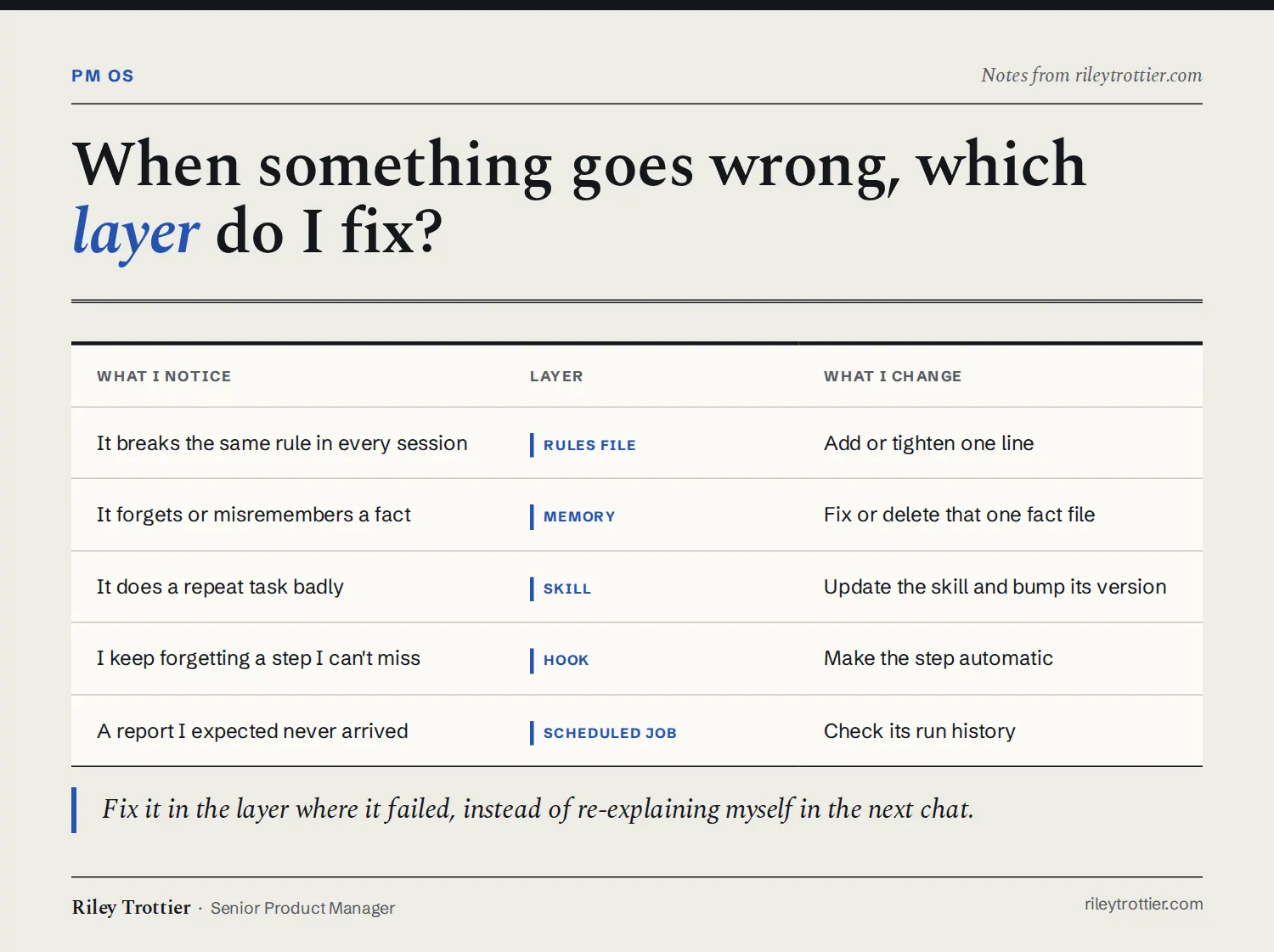
For example, the first time the monthly session review ran, it found corrections I'd made mid-conversation that never reached the skill files. I'd said "do it this way next time", the assistant agreed, and nothing was saved. Those get caught now, and the fix goes into the skill once. A missing report is the same idea. I go straight to the scheduled job's run history instead of guessing.
If you're building something similar, I'd start with the rules file. It's the smallest piece, and every other layer depends on it. Then move to skills, and then routines and scheduled jobs. The other pieces will fill in around those core pillars. It can take some time to make it work, but once you get it going, your productivity will increase dramatically, and your AI will catch all kinds of details you might miss.
Views are my own and don't represent Workday.